Your next order.
Right on the chart.
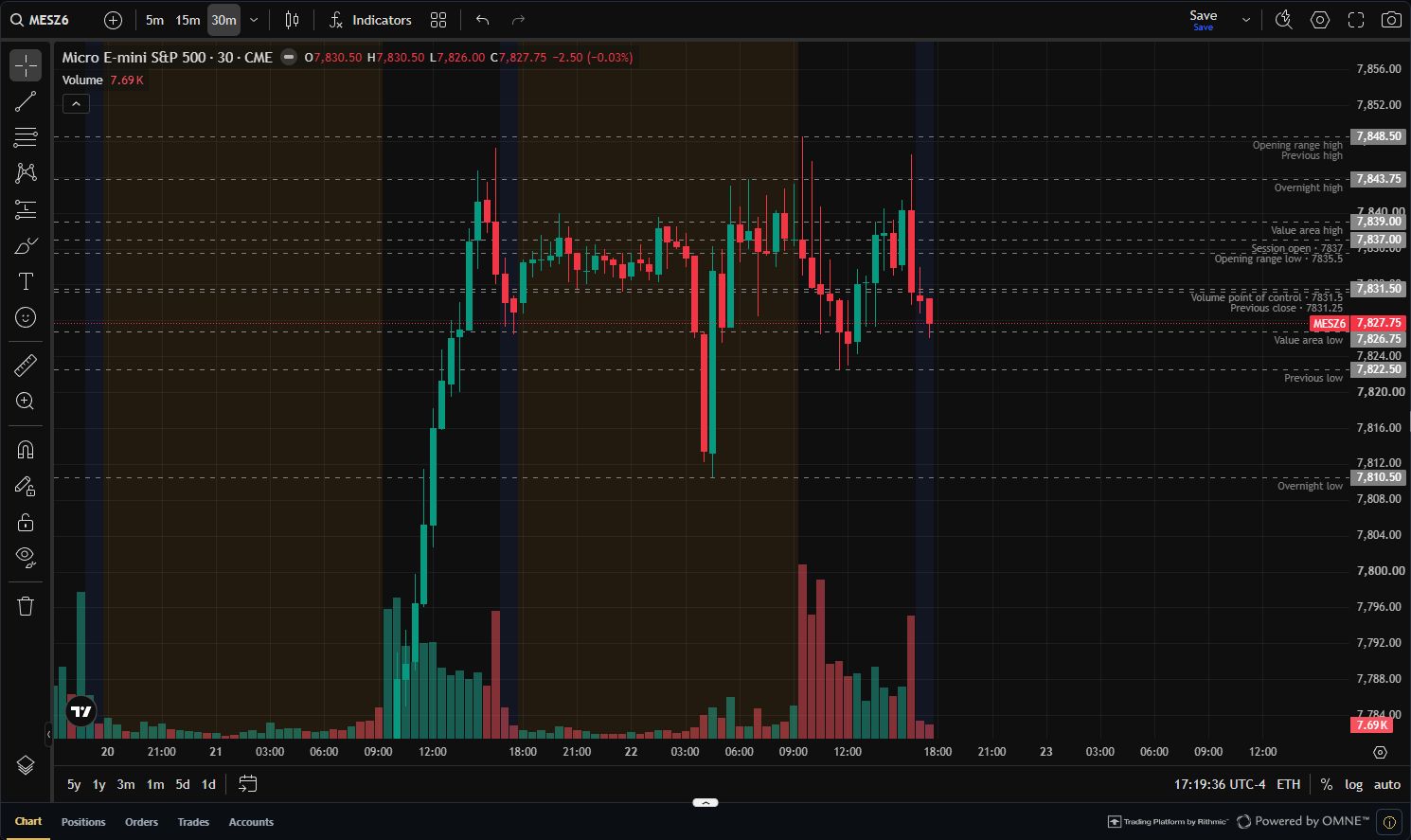
Ctrl + click to place an order at your chosen level. Left click to buy. Right click to sell. Choose whether to show an order confirmation.
Stay with the chart. Keep control of the action.
Free futures terminal
Powerful charts. Thoughtful execution. A connected workspace to plan, trade, copy, and learn from every session.
Terminal access is free. Your browser is all you need.
Market data and feature availability: view access details.
A home for your whole process
Your chart is the center. Your planner, journal, copier, and account insights are one move away. Explore the workspace below.

Advanced charting, indicators, drawing tools, watchlists, and session levels. A familiar workspace, with room for your own process.
Bring your context, key levels, and risk budget together before the opening bell.
Mark the overnight high and low. Let the first move develop. Trade only the setups in the plan.
Connected trade records meet the context only you can add.
Price returned to the level in my plan. I waited for confirmation before entering.
The best part of this trade was the wait. Keep the same entry criteria next session.
Choose a leader, set follower sizing, and see the status of each account.
Look beyond one trade. Compare setups, session timing, and how consistently you followed your plan.
Keep trading results, account expenses, and cash movements in one considered view.
Bring your session, setup, and account insights into a focused report.
Made for the moment
Keep the market in view while your tools handle the steps between an idea and a well-defined order.
Ctrl + click to place an order at your chosen level. Left click to buy. Right click to sell. Choose whether to show an order confirmation.
Stay with the chart. Keep control of the action.
Choose your dollar risk and stop distance. The Terminal calculates the contract quantity so you can focus on the setup.
$200 estimated stop risk
Try it: illustrative contract at $5 per point. Before fees and slippage; actual loss can differ.
Define your entry, stop, and target together.
Account, position, quantity, and order status within reach.
Saved layouts, watchlists, themes, and timezone controls.
Copy Trader, close to the action
Trade your leader account and coordinate eligible followers under the same connection. Keep sizing intentional and every account’s status visible.
Illustrative workflow · Each account keeps its own status and controls.
The session doesn’t end at the exit
A connected planner, journal, and review workflow keeps the reasoning behind your trades as close as the results.
Set the session intention, mark your levels, and bring a defined risk budget to the chart.
Day Planner + ChartsConnect the trade record with your setup, notes, and screenshots while the decisions are still fresh.
Terminal + JournalReview patterns, include the costs, and take one useful lesson into your next session.
Analytics + Finance + ReportsTry the theme control in the navigation. The whole page follows your choice.
Comfort is part of the workflow
Choose dark or light. Keep your preferred chart layout, watchlists, and timezone. Open the workspace in your browser and pick up where your process left off.
Less setup. More workspace.
Launch in the browser. No desktop installation to manage.
Use eligible Rithmic credentials and the market-data access assigned to your user.
Choose a contract, set your chart, and build a workspace around your trading day.
Clear from the start
The workspace vision, what’s available, and what you need to connect.
Yes. Terminal access is free. Eligible Rithmic credentials and market-data entitlements are separate. Free copying within one connection is part of the planned Terminal experience; existing Copier membership and capacity terms apply until that release. Other products and cross-connection workflows may have their own access requirements.
View current plans ↗This page presents the complete Terminal experience we are building. Charting and eligible account reads are available. Quick chart orders, automatic risk-based sizing, free single-connection copying, and the connected left-rail workflows are being completed. The interactive tour includes designed previews with illustrative data.
Order routing is currently locked pending Rithmic approval and a separate release. Tradesera Terminal supports approved simulated environments and does not route live-money orders. Quick trading and protective-order workflows will follow the permissions of the released product and connected account.
Connect eligible provider-issued or Tradesera-provisioned Rithmic credentials using the assigned system. Contract availability and exchange data depend on that user’s entitlements. Terminal access does not include exchange data or change account permissions.
Market-data details ↗The Terminal left rail brings Day Planner, Journal, Copier, Analytics, Finance, and Reports into the trading workspace. Integration is being completed in stages. Record coverage and synchronization depend on the supported source, consent, and product access.
The Terminal is browser based, with layouts for desktop and mobile. Keyboard shortcuts are desktop interactions; touch devices use on-screen controls. Feature availability follows the same account and release requirements.
Credentials are encrypted server-side for the session by default. Choose Remember connection to restore access on this browser for up to 30 days. Forget or disconnect removes the saved connection.
Replay, backtesting, and challenge simulation are separate training products. They have their own access and release requirements. Free Terminal access does not automatically enable them.
Explore training ↗Make room for your best process
Your next workspace is already in the browser.
Free Terminal access · Market data and account permissions are separate.